I’m sure slabbed values are tricky, especially with small sample sizes. But why would the value of the 9.6 be linked to a 9.9 grade and not the closer 9.8 grade?
Is there a way to change this in CLZ? I’m sure this is more an issue with coverprice than CLZ, just curious.
Yup, Reinharc has it. You’d think it would be easiest to “just use the closest grade” - but unfortunately there’s a lot more nuances when trying to provide a replacement value when there’s no sales data available for a given book in a given grade. What if the next closest grade to your copy has a sale from years ago before there was any interest in the book, but there is a sale from 2 days ago that is 2 grades away? What if the closest grade has an auction sale that ended at 2 am from a shady seller and went for WAY lower than a somewhat lower grade sale from a reputable seller that sold a few days earlier for much higher? Building a logical system to handle the various scenarios is something we’ve been working on, but for now we use a simpler, albeit flawed, technique.
So we use what’s called - Most Common Condition Fair Market Value. We look at which grade (if your copy is slabbed, we look at the slabbed sales, if its raw we look at the raw sales) has the most recorded sales. We then use the FMV for that grade as a substitute (however we show you we’re using that different grade so if you want to come up with a value on your own you can do that).
In this case there was a relatively low sample size of slabbed copies recorded as sold. That is product of it being a newer book (from this past summer) AND the fact that sellers list this book in a LOT of different ways - making it hard to auto match sales to our comic database. Some refer to it as SDCC, some as KRS, some as Comic Mint, some as TCM, some as virgin, some leave the virgin part off, some mention the cover artist Sozomaika, etc. We store meta data about each comic/magazine to help with auto matching sales to books in the database but you’d imagine that with over 700K books in the database it can be more of an art than a science.
The good news here is that I was able to locate a few more slabbed sales, so now we have more 9.8 data points than other grades - making the 9.8 the MCCFMV (as opposed to the previously used 9.9). I still don’t see a 9.6 sale recorded so you’ll end up with the 9.8 FMV for both your 9.8 and 9.6 copy; but if you wanted you could always estimate the value of the 9.6 lower than the 9.8 and enter that value in CLZ (this feature is also available on CovrPrice).
Hope that helps and thank you to @Reinharc for jumping in.
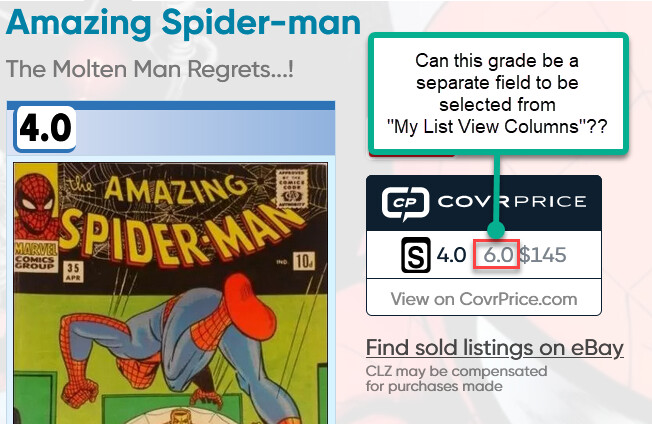
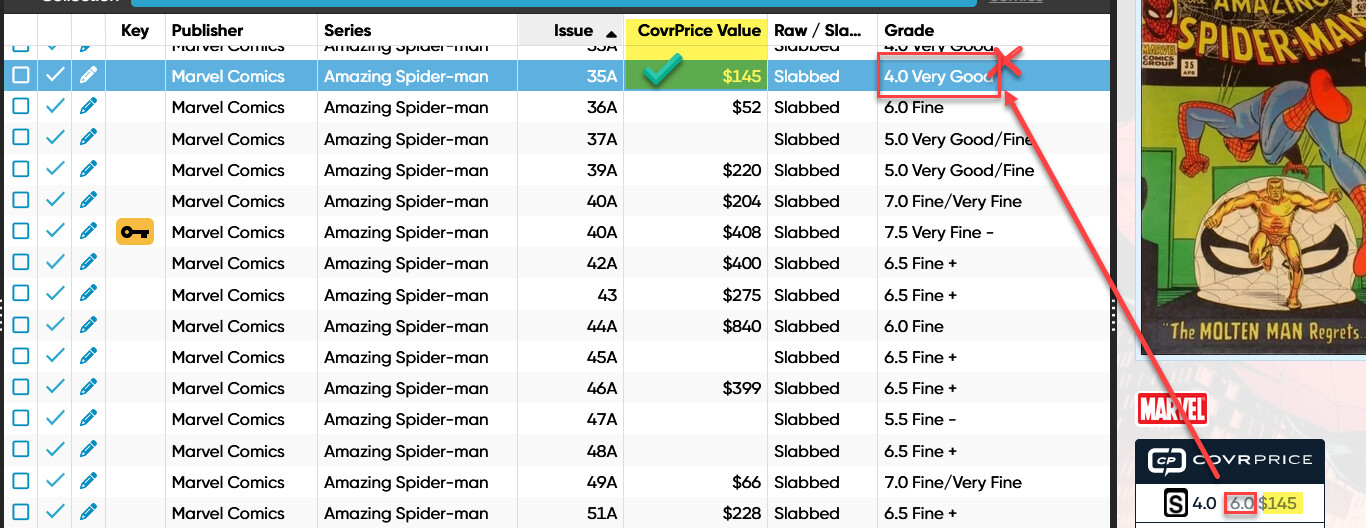
Is it possible to have the ‘grade’ that was used to get the value as a separate field ?? That field can then be selected under the “Manage Column Favorites” to be included in the “list view”, *.pdf file and also when creating an export *.csv to be used in a Excel spreadsheet and other places i dont know about. This would help to identify CovrPrice values that needs extra attention. Thanks
CLZ would have to comment on features in their program. Some other considerations here:
You’re showing the UK edition for ASM #35. There’s going to be very few sales available for a book like that, and as such, you will almost assuredly get an MCCFMV type of value, as there’s a high likelihood that no sales data is available for your grade.
Values can only be exported by yearly CP subscribers, so if you’re looking for some sort of my grade, MCC grade, and price type of export, such a feature would be dependent on CP subscription type.
A lot of the books are like that, ASM are now fixed.
I am a yearly subscriber to both CLZ and CovrPrice.
Is it possible to have CoverPrice return a “CoverPrice Grade” so that it can be selected to display on views and reports?? Fox example: In the screen shot below it would help if we could display a “CovrPrice Grade” in addition to “CovrPrice Value” , the way its shown now is incorrect - the value $145 is not for a grade 4.0 but for a most common grade 6.0.