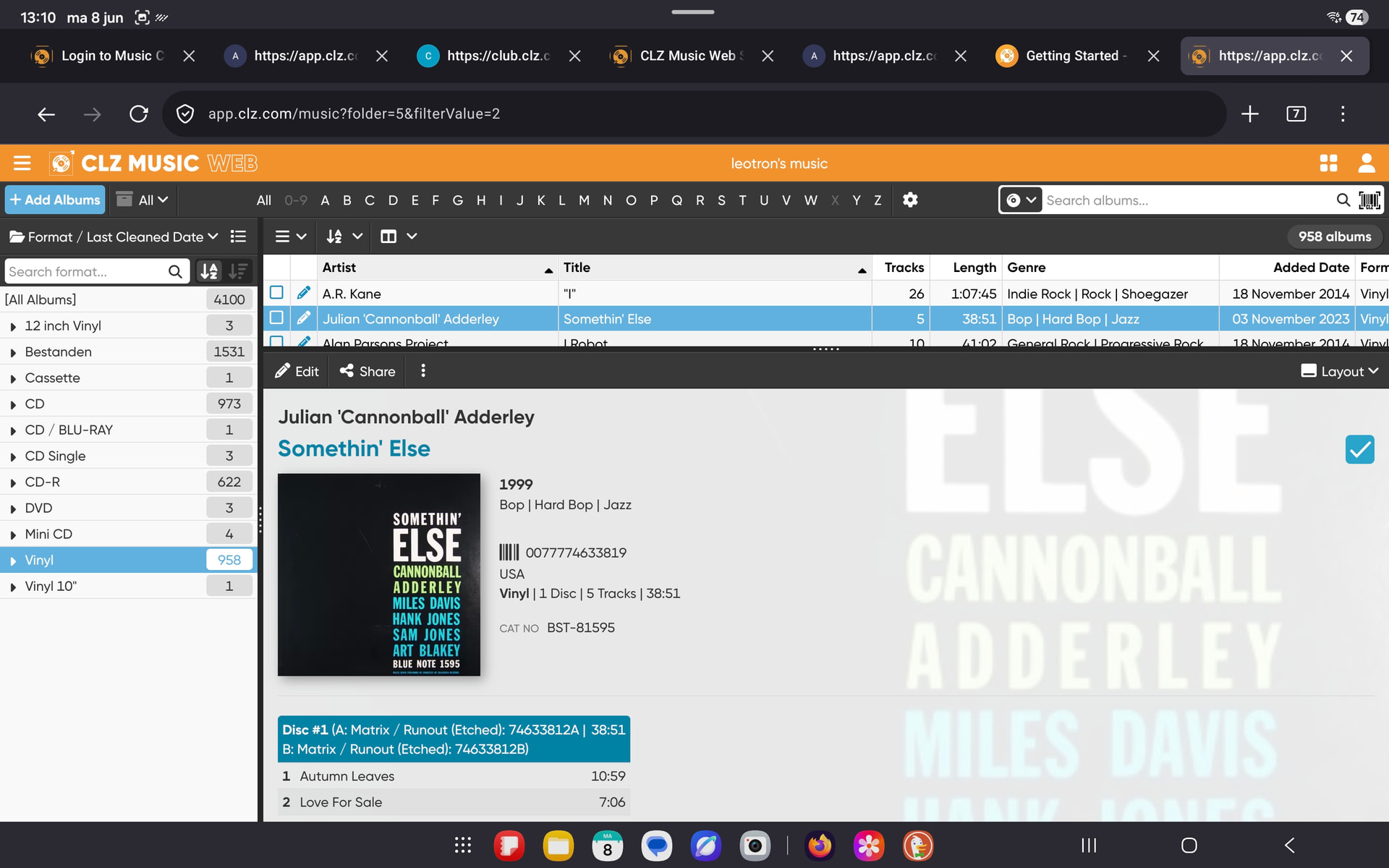
I just switched from the desktop to the web version and I found some things I’d like to mention:
In edit mode, when accessing Custom Fields (I don’t have any yet) and then cancelling, none of my changes are saved and edit mode is ended. Maybe this is not so when one does have Custum Fields, but it seems like a bug to me.
In edit mode, under Tracks, the boxes for entering the matrix codes are quite narrow, whereas the box for Disc Title (not relevant for me, and not needed for vinyl) is extremely wide. Maybe change the lay-out?
Speaking of Disc Title: I have to enter a space to keep 'Disc #1" from appearing in the duration box in display mode where the matrix codes are displayed; also, it would be nice to have a line wrap between Side A and B in the display box (they are separate fields, after all)
Otherwise, I’m getting used to the web version and am liking it so far. Keep up the good work!
Can you explain in greater detail? I have no idea what you’re doing here. If you edit an album and then just click “cancel”, of course anything you entered will not be saved. What are you trying to achieve by editing and then clicking cancel? What did you expect it to do?
Thank you for your suggestion.
I don’t understand.
You have to put a space in the “Disc Title” field, because otherwise “Disc 1” appears in the Duration box? Eh?
Sorry if I was unclear. By ‘cancelling’ I just meant ‘abandoning’ the action. So, in Edit mode, when I have edited a few fields and then click on the User Defined Fields tab (I don’t have any yet) and then click on another tab (say ‘Personal’) edit mode is ended and none of my previous edits are saved.
As pointed out by another user, I was referring to the box in the main display window that reflects the entire duration of an album (right above the track listing). If matrix runout fields contain data, it is displayed here, preceded by anything that is in the Disc number field (and if that is empty, it displays the place holder ‘Disc number’). Preferably, the lines displaying matrix runouts for Side A and B should be on separate lines.
I hope this clears things up. Sorry for no screenshots, bur I am alway struggling with how to do them…
I follow your first 4 steps;
In the ‘dialog window’ of Custom Fields I click Cancel. I expect only to cancel that window, but it cancels the entire edit session and of course then nothing is saved. I now realise that this is not a dialog window and that I am still in the overall edit session. So I have created some unnecessary confusion by thinking I was in a separate dialog window. Sorry about that…
As to the matrix fields, I just copy the text from Discogs after I found the exact version I have. I used to save it in Notes where space is no issue. I will trim the text from now on, but I still feel it would be nicer to have Matrix A and B on separate lines in the main display window.