There is a bug in the Desktop version and I realize that it probably won’t get fixed, but I bring it up in case the same thing is happening in the Web version. The issue is with capitals in the artists’ names.
In the Tracks tab when I add an artist with a name like McDonald, McHenry or McMillain and I click on new artist after typing the name in the search box it will give me Mcdonald, Mchenry or Mcmillain. It doesn’t retain the capital letter after the Mc. If a person isn’t really paying attention they will miss it, like I have a few times.
Also, if I have a nickname in quotes such as Joe ‘Shorty’ Smith it will give me Joe ‘shorty’ Smith, not capitalizing the first letter after the quotation mark. I did notice however that if I use double quotes it will give me Joe “Shorty” Smith. Unfortunately, I have been using the single quotes all along and have been correcting it as I catch them. If I miss it, then hopefully I’ll catch it when that artist comes up again or it’ll pop out at me when I’m in the pick lists.
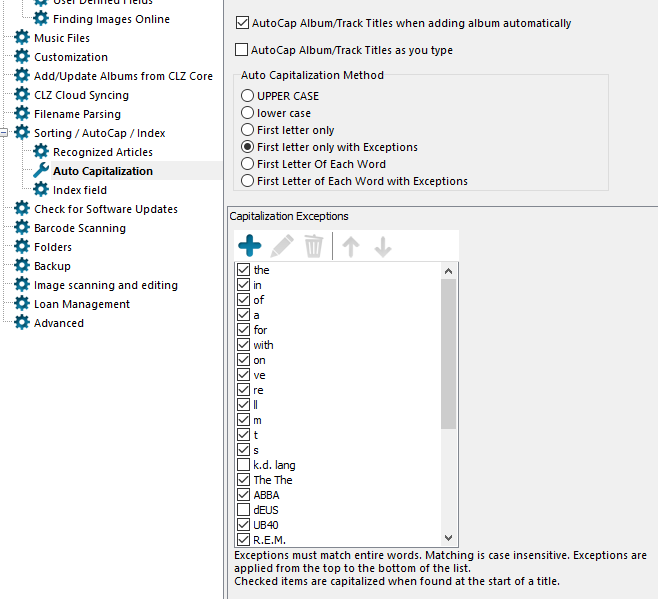
In Tools | Options | Auto Capitalization you will find the following screen. Simply select the option that gives you the best result. Probably “First Letter of Each Word with Exceptions” would give the best result overall, working well with Titles and Artists.
Sorry, but this is not the fix. I had the bottom option selected (First Letter of Each Word with Exceptions) and changed it to First letter only with Exceptions as Steve suggested. It only made it worse by only keeping the first letter (as it states) as upper case - To add Joe McHenry, it will give you Joe mchenry.
Not to worry, if it can be fixed that would be great. If not, I’ll just deal with it and move on.
To be honest I would disable the autocap completely for these kinds of names. There is no way indeed to have it “allow” a middle letter top be a cap with any of the settings, unless you put “McHenry” as an exception.
As for fixing: there’s not really a fix I can think of other than “ignore middle caps if typed by user” - but yeah, Music Collector is not developed anymore. This would also happen on Web I guess. So I’ll take note.