When I’m looking at a list of books in wishlist mode, I often wish to see just the A or regular editions and not the variants (B, C, D, etc.). It would be nice to have a filter that gets rid of everything except these non-variant covers. For example, in my Uncanny X-Men, Vol. 1 wishlist, I’d like to use this filter to see just the regular issues I’m missing. So 1A, 2A, 9 (which has no letter) would all show up, but 1C, 94C, etc. would not. Thanks for considering this idea, and thanks as always for this amazing app I am happy to use every single day.
Thank you for your suggestion, this is on our ideas list. For your situation, can you explain a bit more as to why you don’t want to see 1C but rather 1A if you have them both on your wish list?
And what if you don’t have 1A on your wish list, but you do have 1C on your wish list, do you still want 1C hidden?
>> can you explain a bit more as to why you don’t want to see 1C but rather 1A if you have them both on your wish list?
I have many cases where I’m looking to complete runs and that would mean getting both the variants and the main covers. However, I very often find myself flipping through boxes in shops with CLZ open on my phone and the vast majority of what I’m finding in boxes are main covers. I would like to have the simplified view with just those covers so I can quickly go through what they have and be looking at things in a very like for like manner. Seeing only the A covers in the app and flipping through what are 90+% of the time only A covers in the boxes. If I’m seeing a lot of variants, I can always flip over to the full list. But that feels like more the exception than the rule in those cases.
And what if you don’t have 1A on your wish list, but you do have 1C on your wish list, do you still want 1C hidden?
Yes. Because that cover just isn’t nearly as likely to be in the boxes.
This is also a priority thing in my mind. If I’m trying to complete a run, the main covers from the original run of the book are the main targets. If Marvel releases a bunch of variants of an old book that are now showing up as C, D, E, etc. - those aren’t as important to completing that run as the original covers from that run. Hope that makes some kind of sense. Happy to answer more questions.
Wait, you said “wish list mode”, but… are you referring to the Missing Comics screen maybe?
If so, then YES, this is already possible:

No. Was not talking about the missing comics screen. I don’t find that screen useful when I’m at a shop looking for things in stacks and boxes because it simply leads to the “add comics”. I can add things to the wishlist there, but that leads me back to the original issue. Me on the wishlist (screen shot below) looking at both variants and A/regular cover issues all mixed together. A slider like you have for the missing comics screen would be precisely what i’m looking for here.
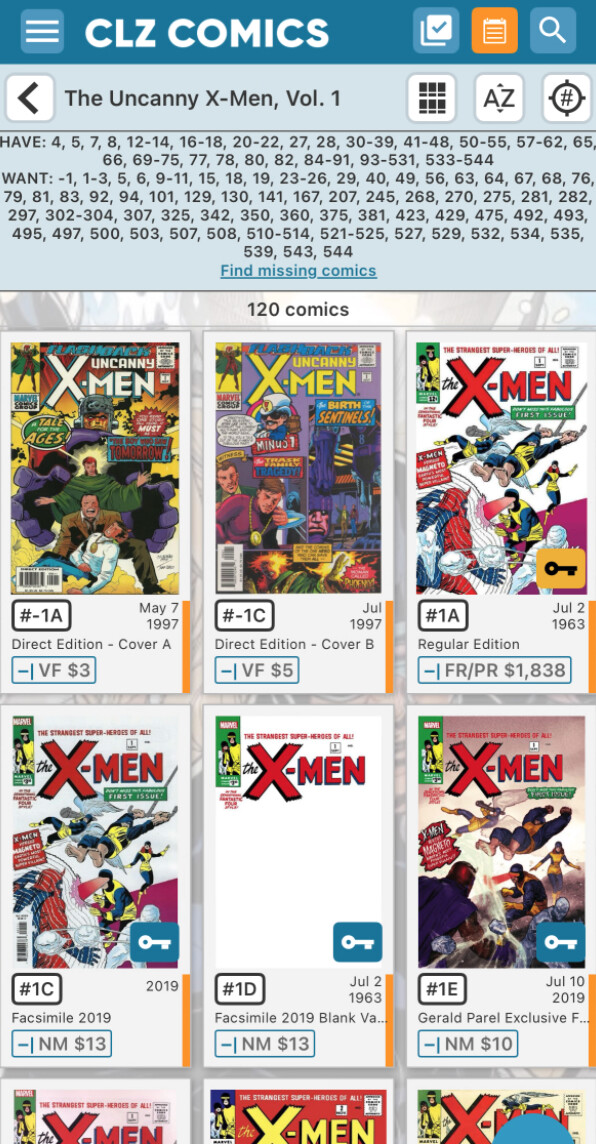
Wade, can you take a look at the Add Screen and then on the NCBD tab, and then on the “All” tab.
We have a view there that has “collapsed” comics.
This is where we collapse all issues (regardless of variants) into 1 “stack” which you can tap to open.
If we were to introduce that way of viewing issues into the main screen of the app, your 1A and 1G would be “stacked” and the entry would just say “1”.
You could then tap it open to see which variants you have on your wish list.
The image used for the stack would most likely just be the “lowest” variant letter, usually A.
Would that be a solution for you? (just thinking out loud here)
I’m pretty sure you’re not saying you would add what I’m talking about to the “Add” workflow, but, just in case you are, that would not be waht I want.
In general, that makes sense to me. But how would this behave if I only have variants of a certain issue? I was hoping to have no variants show up in this ideal view. So if for issue 1 I only had 1C, 1G, and 1V on my list, no issue 1 would show up at all when variants were hidden. If I have 5A, 5G, and 5Y on the list, then 5A would show up - and I guess I could click on that to see the other 5 variants. Hope that makes sense.
Indeed I was not saying that, I was just pointing out that we have a more advanced “stacked issue view” in NCBD, as an example of “stacked image view” - so that we might incorporate that into the main screen.
It would just show issue “1” - with the first visible variant (so that could be C) as the “main cover” for it. It would show as a “stack” of issues indicating you have more variants in your list.
When you tap it, you would see all variants you have in your collection for that issue.
Since we have this cool issue stack view, and reading your question, I was thinking this could be a cool solution for it, and in all a cool new view mode in the app!
So that’s not exactly what I was hoping for, but it would be better than the current situation with all the variants displayed all at once. I assume that means it would also not show any issues for book where I have nothing, yes? So if the only things I had were 1C, 1D, 3A, 3G, 3J, 7A, 8D, 8G, and 9A, then I would see 1C, 3A, 7A, 8D, and 9A - and nothing else, right?
Right now, It seems like the “top” of the stack doesn’t show the issue number. Would it also behave that way in the that does? Without knowing if I’m seeing the variant cover, I’d end up having to click every time which sort of defeats the purpose of having the list at a glance. I’m not one of those freaks who have all the covers memorized - that’s why I love your app so much!
Hope that all makes sense.
The stack view would in your case show
1, 3, 7, 8, 9
The image of the stack would be
1C, 3A, 7A, 8D, 9A
But on the image you would not see which variant you’re looking at.
I’m guessing for this scenario then the proposed stack solution won’t work.
Will think about it, I have your request on our list now.
Seems like that’s SOOOO close to something that would work. I don’t program everyday anymore, but if you’re already pulling up the right image, there’s got to be a way to label them with the info I would think. If it had a little “1C” on that cover, that’s something I could totally make work. I would just train myself to visually pass over anything that wasn’t an A (e.g. 3A) or a “regular” (e.g. 9 - with no letter). that would be a big improvement from where i’m at right now.
I feel like i have to say this again: I LOVE your app!  Please don’t take all this as major criticism. It is already the only app on my phone I always enjoy using. These things I’m asking about are tiny, incremental improvements. They don’t change how awesome it is in my mind.
Thanks for confirming. I didn’t think it was criticism and we’re happy to talk with users and deep-dive in what they need, and then for us, decide if that is something specific for one user, or useful for more. Or combine it into something that would nearly work for the specific request, and be beneficial to the larger group.
I think we (nearly) got something here, so I’ve written it down 
1 Like