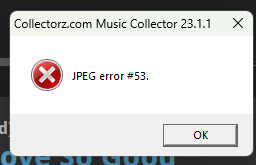
I’m getting this error with some of my images. Any idea how to fix it?
I had similar issues in the past where I uploaded a non jpeg in Web and synced it back to the desktop app. It is also possible the Core data does not hold a jpeg but a different format.
1 Like
I recommend editing the album, then edit the image and saving it again.
Or edit the album, add a new image to it and save it. That also works.
OK, this is odd. When I go to the Covers section, I see the image just fine. But the image shows the error on the entry listing. And when I try to edit the image, it’s telling me that Music Collector cannot locate MSPaint.exe. Are you using a different image editing program?
Your best bet is to pick a different image editting software, do you have one?
If so, use TOOLS > OPTIONS > IMAGE SCANNING/EDITING and change the image editing program to what you want.
We advise to do the above.
But better yet, you could just download a new image and use that instead.
That is because the old Windows software in the Edit Screen doesn’t care about the extension/format, and just displays it. It can be smart like that. The details panel however uses old Internet Explorer components to display html, and well, this day and age it just throws up when something is wrong, giving you that error.
All good now. Thanks!
1 Like