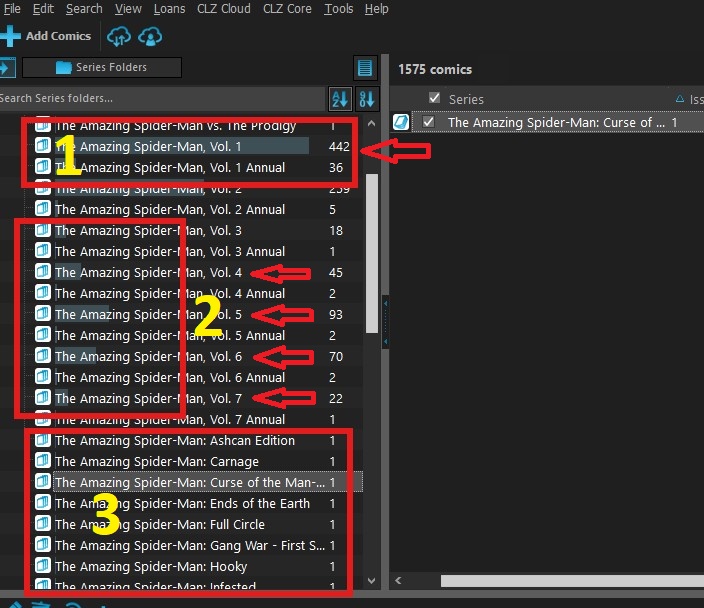
Hello all, hoping to get some answers on a few questions. Reference attached photo for all.
1st, block 3 shows 8 different comics (but there are many more than 8). I want to create a folder, label it Amazing Spider-Man One-Shots and then place those 8 and many more into that folder so all my One-Shot issues are in one folder. I have about 60 one-shot issues with each issue in it’s own folder. Can this be done? If so, I could not find directions to do so.
2nd, looking at blocks 1 and 2, all of the folders with arrows pointing to it, have shading in the titles.
Example 1: Amazing Spider-Man, Vol, 1 the whole name is shaded. Example 2: Amazing Spider-Man, Vol, 4 Only the word “The” and the space after it are shaded. Example 3: Amazing Spider-Man, Vol, 5 “The Amaz” is shaded
What’s up with that, and can I remove it? It is the same color highlight that my selected selection has and it throws me off sometimes when scrolling or working fast.
3rd, Ha, can’t remember what the 3rd was…LOL I’ll get back to you when it comes to mind. Thanks in advance for any assistance you can provide.
I don’t think I would do this, because you would lose whatever is in the series title. You might be better of by making a top level folder like Series Group (just click the folder button at the top, then create your own folder favorite with Series Group first, and then second “Series”.
But yes, what you want, is possible. Like so:
Go to menu Edit > Manage Pick Lists
Click the Series list.
Now search for Amazing Spider-Man
Now select those one shot titles, right click the selection and merge to 1 of them.
Now find that one you merged them to in that screen.
Right click it and hit Edit and rename that series to “One-Shot”
Save.
For others, merge them into that One-Shot folder.
IMPORTANT: Note: you will lose whatever you have in the Series field for that (so “The Amazing Spider-Man: Ends of the Earth” will just be changed to “One Shot”. Just so you know. I wouldn’t do this.
Those are bar charts indicating how many of the books are in that folder versus other folders.
Yes you can!
You can switch it off using Tools > Options > Customization > “Show bar chart in folder panel”.