Purchase Store Folder

Greetings:

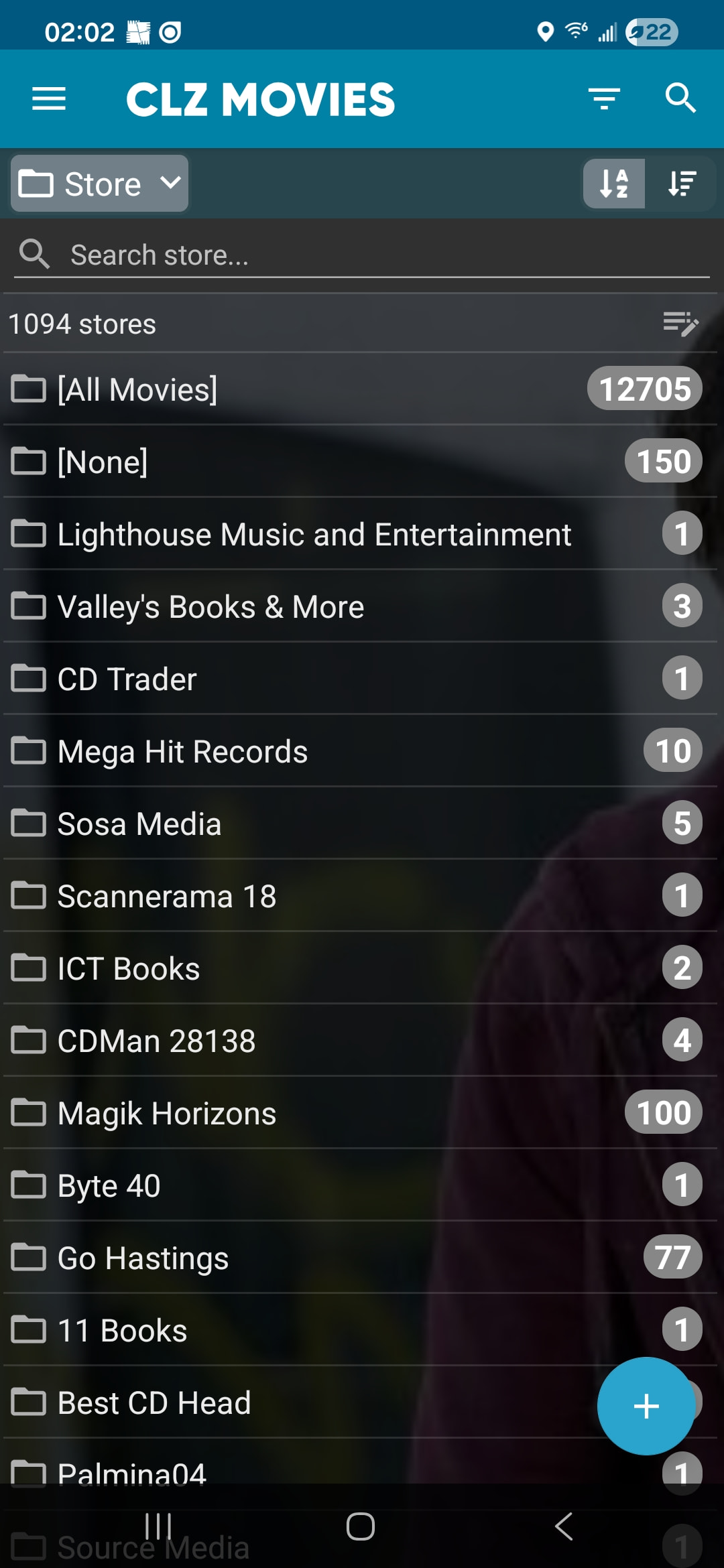
I have come across an anomaly with the PURCHASE STORE Folder.

It appears that the listings in the Folder are just kind of haphazardly listed. I checked several other folders and the contents all appear to be correctly alpha-numerically listed.

I can change to them being listed from greatest number to least but not alpha-numeric.

Not sure if it has ever been reported or if it is even an issue.

This is only noticed with the Folder aspect; the Manage Pick List PURCHASE STORE aspect works as advertised

I am using the latest version on an Android device.

The screenshot below shows the issue:
Looks like a bug indeed since the new version, we’ll work on a fix, likely to go live in the coming week. My apologies for the inconvenience, thanks for letting us know. If you see this problem with more folder options, let me know!

@JUnderwood this should now be fixed in CLZ Movies v11.2.5 for Android.

Your app may have updated itself already (check the menu top left, the version number is at the top).

If it hasn’t updated itself yet, here’s how to force the update:

on Android:

  1. On your device, open the Play Store app.
  2. Search “CLZ” and select your CLZ app.
  3. Tap “Update” to update the app.