Hi all. It is probably a bit unorthodox but, as our preference is to gorge ourselves on completed TV series, I make a note for every TV Series whether it is Uncompleted, Completed or an Anthology in the TV Series field. I don’t put the TV Series title there as it is always in the Title Field. So I only have those three ‘series titles’ in the database. With 4200 odd movies and TV series I have found this is the only way I can easily find the next show to watch by using folders to identify those completed or anthological series yet to be seen. Please see the attached pic and the one in the next post. I am curious as to whether I have missed some key feature of CLZ Web that accommodates what I am doing with this workaround, and whether my workaround will work on CLZ mobile, which I am considering switching to at some stage.

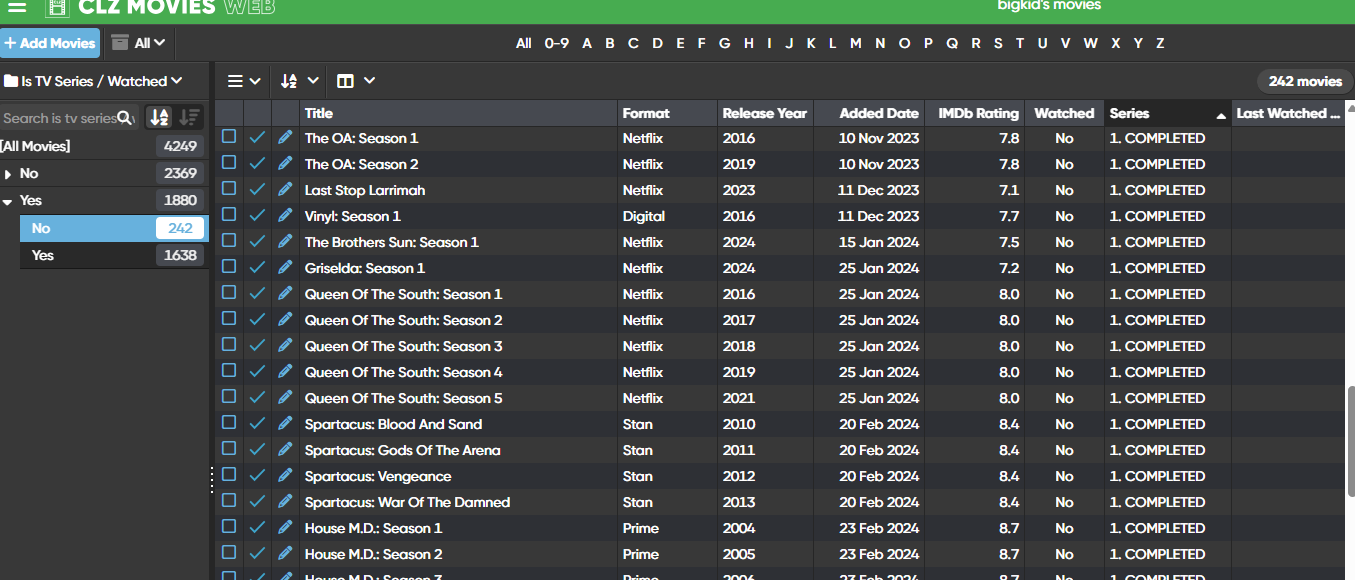
There is no field to mark the entire series as watched (and you would have to set it for each season if it is a field part of an entry of course, which you’re doing now).
Not sure about using the Series field for this though, but, looks like you know how to do it (with using just 3 “series” entries which aren’t really series - and it won’t do any harm).
We’re working on Custom Fields, where you would be able to set your own custom fields - so you could make a specific field of your own for this. (the mobile versions will follow even more later - so it’s not a solution for now).
I don’t think you’re missing any CLZ Web specific solutions for what you’re trying to achieve 
Here’s a suggestion for another way to do what I think you’re trying to accomplish while using the fields the way I think they were more intended. When you watch an episode, mark it using the ‘Watched’ and ‘Watched Date’ fields on the ‘Episodes’ tab. Then, when you finish a season, mark it using the ‘Watch History’ field on the ‘Personal’ tab. This assumes you’ve added your TV series’ as seasons, which it looks like you have. For tracking your anthologies, I’d suggest creating an ‘Anthology’ tag in either the ‘Genres’ field on the ‘Main’ tab or the ‘Tags’ field on the ‘Personal’ tab.
Then, I’d suggest creating ‘Series Completed’ and ‘Series Uncompleted’ tags in the ‘Tags’ field on the ‘Personal’ tab. That way, you can mark each of your seasons as completed/uncompleted for the entire series, and then you can filter on the particular tag as needed. That then frees up your ‘Series’ field to be used for creating groups of series, which may not be just a TV series. For example, I have a series called ‘Batman’ that I use for all my Batman related movies and TV shows.
Then, when they finish creating the custom fields feature, you can create a dedicated ‘Watched Series’ field. You’ll be able to filter your TV shows on the ‘Series Completed’ and ‘Series Uncompleted’ tags to easily set that new field. You might even be able to use their “Transfer field data” feature to automatically populate that ‘Watched Series’ field for you.
Anyway, just some ideas. Thought I’d share.
Thanks AJ and Jonathan. Sounds like the tags option might be the go before the implementation of custom field. Will have a play with that over the next couple of days and report back. Appreciate the input. Cheers, Allan
**Just had a go at using tags and while it took a bit to get my head around, it seems to work. Might use it in tandem with my existing method until my workflow adapts. Cheers, and thanks.