Hello, I’d just like to report an issue with the Signee section of the app (web and mobile).
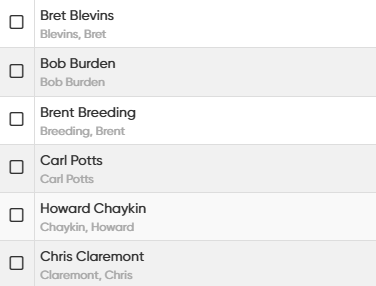
As shown in the image below, after being entered as a new signee, the name will sometimes list (and sort) as “LastName, FirstName” and sometimes as “FirstName LastName” (see Carl Potts and Bob Burden below).
When I enter the names, the app does a good job auto adjusting the name to the proper format but at some point it reverts to “FirstName LastName”. In addition, I have gone through and manually edited the list to the proper format several times, but names seem to randomly revert to the wrong format on their own.
Unfortunately, I have no way of purposely reproducing it other than just waiting.
I can say that up until yesterday, I had only entered and edited Signees via the mobile app. Yesterday while making the above forum post, I used the web version to go through the list and re-format all names which had reverted (about 1/3 of the list had mis-formatted). Checking just now on the web and app versions, and three identical names have already reverted in both.
Other than that, I can only say that I add names via the usual fields. I type the name in the top box, ensure that it shows as being auto-formated correctly in the lower “Sort Name” box, and click save. If I check back in the list days or weeks later (seemingly) random names in the list mis-format on their own in the sort field to “FirstName LastName”.
I wish I could be more helpful, but the frequency and the names effected really do seem random so far.
Edit: One addition detail in case it is helpful… when adding/correcting names, I have been letting the app format the names on its own. I haven’t been adding commas in the sort box myself to correct them.
I’ve added some signees to a dummy comic on my Web app, then synced to mobile and all remained the same.
Then added the same ones on Mobile app to other comic, synced to cloud, and looked good on Web too.
Then changed the name of an existing one on mobile, synced to Cloud, still remained good.
Then changed the name of an existing one on Web, synced on Mobile, and this is where it will cause to show the right one correctly (as in the changed one), but it kept a copy of the “bad spelled” one in Manage Pick Lists - but that is normal, since mobile doesn’t clear out unused pick list item automatically (you can clear unused pick list items via the menu > Maintenance.
So.. I’ve tried all kinds of routes now, but I can’t make it… go wrong right now.
Do you remember doing like editing of names that were already correct? Or are you just adding new ones?
Sorry for not seeing your response earlier. I appreciate all of your troubleshooting efforts.
Since my last message, a thought occurred to me to check the signers list in each of my 4 collections and correct them all. I had only been correcting them in my main collection. Since doing this, the names have stopped reverting over the past week.
IDK if having the same names in different collections was causing an issue?…