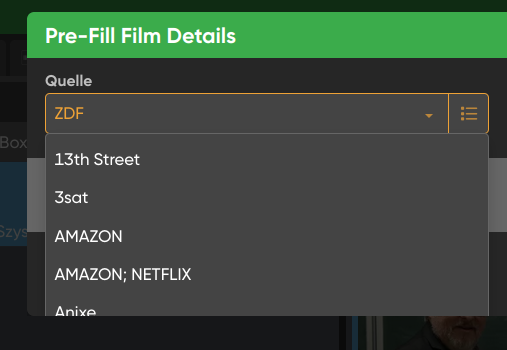
Ich habe eine umfangreiche Filmdatenbank (> 20.000 Filme). Das Datenbankfeld /Persönliches/Kennzeichen habe ich bisher benutzt, um die Quelle der Filme zu hinterlegen (z.B. arte oder ARD).
Ich möchte dieses Datenbankfeld umbenennen in „Quelle“. Geht das? Die KI (perplexity) sagt nein. Ich solle ein eigenes Feld anlegen (natürlich Textfeld) und die Inhalte einzeln übertragen. Bei vielen Filmen einen *.csv Export machen, umstellen und wieder importieren.
Das scheint mir gefährlich. Hätte von Ihnen jemand eine gute Idee?
Please do not trust any AI for questions about our software, it often gets it very wrong and we’ve seen users mess up their database badly when following AI instructions.
But this time, AI seems to be a little bit correct in its answer.
I’m AJ (only one letter difference) and I can help you out.
I’d like to rename this database field to “Source.” Is that possible? The AI (Perplexity) says no. It suggests I create a separate field (a text field, of course) and transfer the content individually. For many films, I’d have to export a *.csv file, change the settings, and then import it again.
You can not rename a field.
What you should do, is create your own field, and indeed transfer the data over, but I would create a Pick List field.
Step by step:
Click the menu top left, then click “Manage Custom Fields”
Click “Add Custom Field”
Choose "Pick List" (not “Fixed List”!)
Give it a name (Quelle)5.
Save it and go back to your main screen.
Next up: transfer the field data.
Click the menu top left, then click “Maintenance”,
Click “Transfer Field Data”
Make sure it is set for “All Movies”
Source field: choose Kennzeichen.
Destination field: choose “Quelle”
You can tell it to clear the source field after transferring, I suggest you do that.
Note: the new field will appear on the “Custom Fields” tab in the Edit screen.. if you don’t want that, I would keep the field you use now.
Danke. Genial. Der Übertragungsprozess läuft gerade. Jemand sagte mal. KD (künstliche Dummheit). Ein Insider der Software kennt die Wege. Ich schaue nur wie “ein Schwein ins Uhrwerk”
Good to hear that Wolfgang. Yeah we’re seeing it more and more in our support channels where people use AI to get a solution, and in return, get more problems. So, whenever you have a question, try asking us first
Custom Fields is a feature we’re still working on for the mobile apps - getting there slowly, but could be another 2 months away depending on how much progress we make will be added, and when we do, we’ll have steps on how to get those fields into your mobile app, including the data you’ve entered for them.