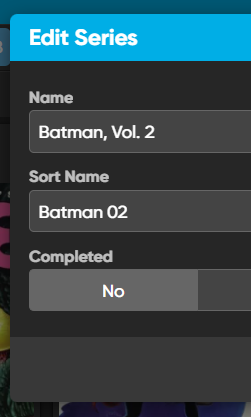
Is there any reason why when updating from Core, my custom sort names keeps getting reset?
I checked the settings and while I have Series checked to be updated, it also affects my custom sort names which is rather annoying. Since there is no report, I have no idea which series’ have been affected. Is this operating operating as intended? If so, is there anyway to prevent the custom sort fields to be left alone during an update from Core?
There is no option in regards to the Sort Name in Add/Update From Core Settings, just the Series. Can the Sort Name be seperated from updating or at least given its own option in the Add/Update From Core Settings?
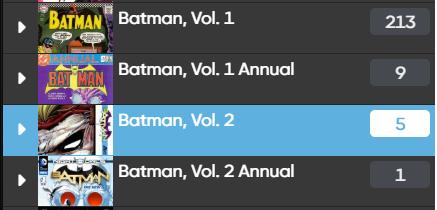
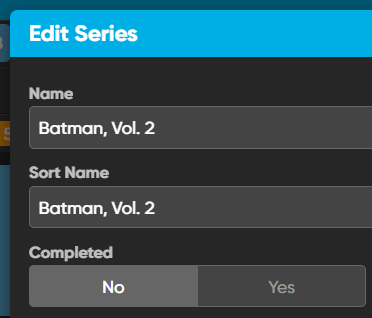
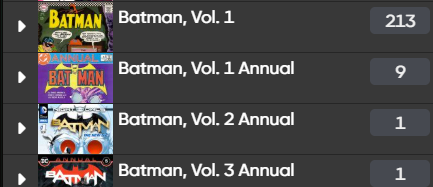
This is also related to adding from Core. If I add an issue of a Series from Core, it will bring along the default Sort Name with it. So in my Series list I’ll have Batman, Vol. 2 in two locations of the list due to the Sort Name being different between the two.
Just a little annoying LOL I hope I was able to clear that up a bit!
You’re saying you’re using “Replace” - why is that?
The series field = name and sortname.
If you replace it, then that will definitely happen.
So I recommend not to use “Replace” as that will replace the series for your comic with what is in Core.
I will take note of your request to split the Series field up into 2 separate “fields” - although it is a bit strange (in my mind, Series is one field, so then it would become “2 fields”) - but I see where you’re coming from.
Question: Can I ask why you use Update from Core, and why you want to use Replace on the series field?
Adding creates a new series:
As for adding where it creates a new series, that should also not happen, and I can’t reproduce that. Can you take video of that for me?
Question: Can I ask why you use Update from Core, and why you want to use Replace on the series field?
I use Update from Core and Replace to get the most current and accurate information from the Core. Isn’t that why it’s offered as an option? I wouldn’t use Update instead of Replace because the Series field wouldn’t be empty.
These are the steps I did when trying to add a comic quickly:
Click +Add Comics
Click Add Manually on far right
Enter Batman for Series
Enter 0 for issue number
Click Add
Click elipses
Click Relink Core Variant
Select Batman, Vol. 2 #0B
Click Click Link to Variant #0B
After it links, the Series name nor the Sort Name has been changed (it will still show Batman, Batman respectively)
Click the elipses
Click Update from Core
With everything set to Replace, click Save and Update
Manually refresh the page
The Series and Sort name will now show Batman, Vol. 2, Batman, Vol. 2 respectively
I tend to visit real-time auction streams and quickly add book in this manner. Later updating them from Core can be a real pain.
I notice the 14 steps to add a comic, I’m now curious why you don’t just search via the Series tab, or even by the Issue tab:
Click Add Comics
Click the “Issue” tab
Type “batman 0” and hit enter. #0B is right there.
Add it, and it will add it to the series you already have (not modifying any series names, or adding a new series)
There’s no need to use Update from Core that way, it immediately downloads all information from Core for Batman, Vol. 2 #0B and put it inside your already existing Batman, Vol. 2 series.
I might be missing something as to why you add through Add Manually though?
Later updating them from Core can be a real pain.
You could click “All Comics” then click the AZ sort order button and sort by Date Added to see your last added comics, select them, and use Update from Core - but if you just added them there’s really no need to use Update from Core on them - you already have the latest data.
use Update from Core and Replace to get the most current and accurate information from the Core. Isn’t that why it’s offered as an option? I wouldn’t use Update instead of Replace because the Series field wouldn’t be empty.
It is there indeed to get the latest data from Core - but (and I don’t know if you do this) it’s not really necessary to do this every day.
But at least I recommend just to not update the Series field anymore when using Update from Core. If you’re happy with your series name, then that is enough.
When an issue is not in Core, I have to do the steps I outlined. When I link that issue to Core later, it messes up the Sort Name which shows when I refresh the page. This primarily happens when I add comics I’d like to pre-order that aren’t in Core yet (ex. Alice Forever After #1). The example I gave with Batman #0 was a poor example but the steps are the same in this regard.
Even if an issue is in Core - I sometimes have to quickly add an issue when don’t have time to sift through the results.
I do not use Update from Core every day; just when I add issues as I mentioned above.
Ah that makes a bit of sense I suppose. Thanks for that.
With the Update from Core setting for Series set to Update, I think it should solve the initial problem.
I’ve taken note that you’d like to split off the sort title for series in Update from Core - but in all honesty I’m not sure if it can make the cut (for the reason explained earlier, that it is a single field).
Are you okay with setting Series to just not do anything in Update from Core?
I’ll try to be mindful of the updates I make and keep looking for a better workflow that includes using the Update from Core because I do think that’s valuable. Thanks for time!
I definitely agree using Update from Core is very useful (but I just think updating series with replace is only useful for some users in certain cases where comics got split into multiple series while they shouldn’t be etc.)
That said, let me know if you have further questions, or want to show a different flow to me for opinions