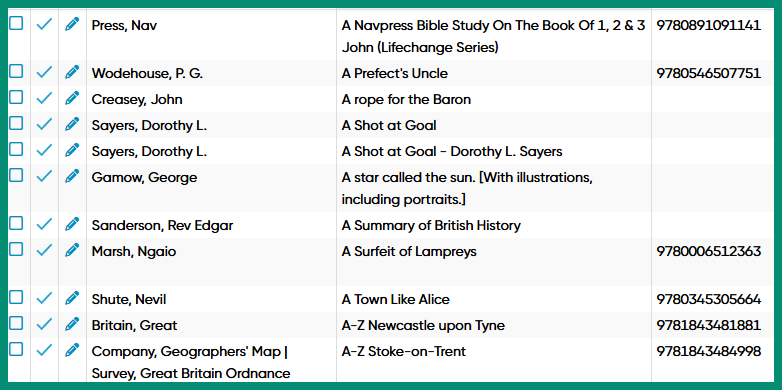
I have applied the recent update to the Sort Title on my web books but it doesn’t seem to have worked fully. I have set the Sort Title on the Add/Update from Core Settings screen to ‘Replace’ and all the others to Skip. There are quite a few titles that are still not sorted correctly:
All the above are sorted under ‘A’; the Sort Title starts with the word ‘A’.
Another example is Dorothy Sayers ‘The Man With Copper Fingers’ has a sort title of ‘abominable history of the man with copper fingers’
Maybe I misunderstand, but I thought that ‘Replace’ would update existing Sort Titles from Core, replacing anything that was already there. Are the entries in Core wrong or am I misunderstanding and doing something wrong?
Is there any way of correcting this other than going through them all manually? I haven’t checked everything, but there are quite a few titles beginning with ‘A’ or ‘The’ that are in the wrong place.
The book “A Prefect’s Uncle” is called “Prefect’s Uncle (a Korean… something)” in our Core database. I think you’ve renamed this book yourself to “A Prefect’s Uncle” - therefore, when you use Update from Core, and we notice you changed the normal title, we will not replace the sort title during Update from Core.
The books below that (with the 0 behind them), are not linked to Core, so the system doesn’t know which book in Core you would like a new sortname for.
This is the reason why it’s not working for those.
I think I can explain all of your books, but this should give you some insight.
The new update does not “just check for books starting. with A, and simply replaces the sort title” - it needs to be linked to a book in Core and the regular title must not have been changed by the user.
That said, since most books are fixed, it’s not a lot of work to fix the ones you still have, it should not be. Just sort by title, edit the first one you see that is wrong. Then just copy/paste the bit without The, from the title field, into the sort title field, then click Next inside the Edit screen to go to the next book. Rinse repeat, only have to do it once for the remaining books that have a wrong sort title!